Program to extract x/y coordinates of points in pdf graphs
There are two techniques for specifying the display information contained in any graph within a pdf file. Raster graphics specifies (e.g., jpeg and png formats) the location and color of pixels, and vector graphics specifies (e.g., pdf and svg) the x/y coordinates of shapes/colors on the page. With vector graphics it’s possible to calculate the graph-axis relative positions of displayed symbols using the page relative x/y positions of each symbol (denoting a measurement point), the graph axis and axis tick marks/values; something I first did out in 2013. My Evidence-base software engineering book contains 10+ datasets that have been manually extracted from vector graphics within pdf files, i.e., by writing a graph specific awk script (a summary of the processes and tools used).
Can coding agents be used to implement a program detects and extracts the x/y coordinates (axis relative) of data points in any graphs, implemented using vector graphics, contained in a pdf file?
Do LLMs know of any tools that already do this? No.
This weekend I attended the Reinvent the Wheel: A Tools for Science Hack, where attendees were given credits for a month of Claude Max (these days I don’t write enough code to make it worth spending more than $20 per month on subscriptions). This was a perfect opportunity, and motivation, to create a specification of the data point x/y coordinate extraction process, and then to attempt to get a coding agent to generate a python program that extracted this data from any pdf file (whose plots were created using vector graphics).
Data points within a graph are drawn using a variety of symbols, and the symbols are drawn using a variety of techniques. For instances, a circle might be drawn using a single internal pdf instruction, drawing four quadrants using Bézier curves, or even eight Bézier curves, or who knows what (it’s very frustrating).
Then there are the tick marks along the axis, some of which are labelled with numeric values, don’t always start/finish at the ends of the axis, and denote a scale that could be linear or logarithmic.
My plan was to specify what was required, briefly describe the internal organization of a pdf file, provide a pdf file containing a single graph and the corresponding extracted data, as a csv file, and see what happens.
The start of my conversation with Claude Opus 5.5 follows:
Write a python program that takes as input a pdf file and outputs the x/y coordinates of individual data points displayed using vector graphics. The vector graphics, as specified by internal pdf instructions, used to display these data points appear on lines bracketed by lines that just contain the words "stream" and "endstream" The data points appear within a graph displayed on a page. This graph contains an x and y axis and may contain other unrelated lines and text within the plot's x/y axis. The required x/y data point coordinates must be relative to the values displayed on the plot's x and y axis. Each x and y axis is drawn as one long line and short tick marks for particular axis values. An internal instruction is used to display a numeric value close to its associated tick mark. Various symbols may be used to display each data point. For instance, in the attached pdf file a data point is denoted by a circle created by joining four bezier curves. The required x/y coordinate is at the center of the approximate circle drawn by these four bezier curves. All data point coordinates must be output, even data points having the same x/y coordinates as other data points. The attached file schump.tgz contains a pdf file and a csv file containing the internal x/y positions of the data points and the corresponding graph relative x/y positions, it also contains the page number and the color of the data points. Each graph is numbered. |
It took about 15 minutes to create a python program that extracted the information from the pdf file that matched the contents of the csv file. I was impressed.
The generated program was then extended one feature at a time by describing some possible characteristics of a graph, and attaching a pdf containing a graph containing those characteristics; for instance (another 15-20 minutes):
Extend the program to support data points displayed as a diamond shape created by drawing four lines. The attached file 53cfc681e8e2afa9feb5820f4886e3018005-009.pdf is a pdf file. The data points are denoted by diamonds created by drawing four short lines. |
This one/two feature at a time iteration looped six or so times before I grouped the remaining features into one update. Two+ hours later Claude provided 4K+ LOC of python code that appeared to handle everything.
The most impressive behavior was spotting minor issues that I had not mentioned and supporting them, or asking if they should be supported.
The pdfgraph2csv GitHub repo contains the code + regression tests.
Is the information in the output csv files correct?
The x/y coordinates of the points in the graphs in my book are available to be checked against. I also plan to repeat the process using a coding agent from another vendor, and to compare the contents of the corresponding csv files. N-version programming, here we come.
Programming language choice is becoming a build option
What significant problems do high-level programming languages solve in a world of coding agents?
The original rationale for using high-level languages was to reduce the cost of porting existing software to different platforms. In a coding agent world, this is a benefit for those interested in having their software run on more than one platform. Is it a worthwhile benefit for those running on just iOS and Android (Shopify recently switched to a common codebase in React Native)? A general answer to this question will have to wait until things have settled down, some years from now.
Some software systems have configuration options that are selected at compile time. Having coding agents generate all possible option configurations is only practical when there are only a few possible combinations. The Linux kernel contains around 15,000 options, and while many of the  possible option combinations are unrealistic, just 243,323 combinations produces a huge variety of executable programs. The source code approach is the only workable approach when many compiler time options need to be supported.
Existing practice is that program source code is written in a high level language, which is then translated to an executable form. Generating source in the programming language(s) being actively used enables coding agents to be seamlessly integrated into existing practices.
In specification based programming, English (or another human language) is the language used to create software. The actual programming language used when generating source code is not yet irrelevant.
Various kinds of activities are reviewed during the development of a software system. These include: requirements review, design review, code review, test review, and acceptance review.
Source code is needed for code review, which is frequently talked about but infrequently performed (an analysis of evidence; see section 6.6.1 for a summary of practices). Code review is a great mechanism for synchronizing practices within a team, training new developers and generally keeping team members up to date with what others are doing. These are benefits that apply when software is written by people. When source is generated by a coding agent, why do people need to review it? The reasons I have heard involve issues covered during requirements and design reviews. Another coding agent might check the code looking for mistakes, and this could be labelled as a (non-human) code review.
If the generated source is not going to be read by people, does it matter which programming language is used to generated it?
Coding agents require source code for training, and this is available in a variety of programming languages. Quantity of source code training data has a significant impact on LLM performance. Generating source in the language most likely to elicit the best coding agent performance is the obvious answer.
Choice of programming language is sometimes driven by current fashions, happenstance or a particular belief system. For instance, the conversion of existing non-Rust source to Rust is driven by the current fashionably status of that language, along with the effectiveness and low cost of coding agents.
Programming languages choice is evolving in to being a configuration option.
I’m sure that eventually somebody will convert the Linux kernel to Cobol and build a running system. As a start, I used the Devin coding agent to convert the contents of the kernel init directory to Cobol source and Fortran source. Both sets of source compile, but don’t link against any other kernel object files.
Before coding agents hackers were content to create their own new Linux distribution. To be leading edge in the future, a hacker will need to translate the Linux kernel and/or distribution to a language of their own creation (LLMs are now building compilers).
Single-handedly creating/implementing a language and using it to implement an operating system used to be a niche activity. First released in 2005, Terry A. Davis single-handedly wrote TempleOS in a language he created and implemented called HolyC, driven by a revelation from God. In the coming years, I expect to see many of these belief driven projects.
Impact of input distribution on faults experienced
The impact of user input variability on number of reported faults is an important issue that is rarely researched. Appropriate user input is one of the three events that needs to occur for a software system to experience a fault. Program fault reports are caused by its users.
I am not aware of any published studies providing the evidence that a change in the distribution of program input values does indeed produce a change in the number of faults experienced. However, the supporting material of a recent paper on N-version programming contains everything needed for me to provide the evidence.
The paper N-Version Programming with Coding Agents by Ron, Baudry, and Monperrus [RBM] uses coding agents to create many implementations of the same specification.
The specification is for a missile tracking simulation program, and the input is a set of (x, y) coordinates representing two-dimensional radar tracks. The program is required to decide whether the set of points meets a combination of 15-conditions for the detection of an incoming missile, whose detection would cause the launch of an interceptor missile. Previous analysis of the RBM data.
In the RBM paper, for testing, the set of (x, y) values were randomly drawn from a uniform distribution, within bounds [-100, 100]. Drawing the (x, y) from a different distribution should cause the number of detected faults to change. I modified the test generator to use a triangular distribution. The mode (i.e., the peak) of the distribution was at: -90, 0, or 90 (the distribution is symmetric, so the results should be the same for -90 and 90; in practice they might not be {they were}).
The initialization loop at line 117 in the file generator.py was modified to call rng.triangular; for instance:
# x = [float(v) for v in rng.uniform(-100, 100, size=numpoints)] # y = [float(v) for v in rng.uniform(-100, 100, size=numpoints)] x = [float(v) for v in rng.triangular(left=-100, mode=0, right=100, size=numpoints)] y = [float(v) for v in rng.triangular(left=-100, mode=0, right=100, size=numpoints)] |
The plot below shows the three triangular distributions used, and a uniform distribution (code+data):

Changing the distribution of the generated points changes the average distance between two randomly chosen points. Given that the 15-conditions involve: the distance between consecutive pairs of points, and three consecutive points fitting within a circle of a given radius, a change of average distance will change the number of detected incoming missiles.
The table below shows the mean distance between two points when the (x, y) values are randomly chosen from the corresponding distribution (LLM derivation), and the corresponding normalised failure rate for three of the generated programs (replicating the original 1-million tests with four of the generated programs; code+data):
x distribution y distribution Mean distance Failure rate Uniform Uniform 104 1.0 Triangular mode 90 Uniform 93 1.9 Triangular mode 0 Uniform 89 2.0 Triangular mode 90 Triangular mode 90 82 3.6 Triangular mode 90 Triangular mode 0 76 3.7 Triangular mode 0 Triangular mode 0 73 3.9 |
The failure rate is normalised to that for the Uniform distribution. The increase in failure rate, as the mean distance between points decreases is a consequence of the particular coding mistakes in the generated programs. Different coding mistakes could produce a decreasing failure rate with distance (it decreased for the python implementation tested, but the rate did not change with distance)
The RBM study used a random number seed of 42. The maximum difference in number of detected faults, for a uniform distribution, when using seeds of 42, 202, 321, 789, 6000, and 20101 was around 10-20%. Changing the distribution had a significantly larger impact than changing the random number seed.
LLM handling of programming language differences
LLMs are trained on the publicly available source code, with no consideration given to the programming language used. There is an implicit assumption that training on code written in X and Y, rather than just Y, produces an LLM that does a better job of generating code written in Y.
To what extent will the characteristics of the training data from language X source ‘leak’ into source code generated for language Y?
LLM source generation is a very new field and significant improvements are still being made to models and agent harnesses. This article lists some issues, and checks how a few models handle them.
It would be great to have lots of LLM generated code to measure, and there are a few collections of LLM generated code. However, reliably distinguishing human from LLM generated code is an open problem. A 2025 study of Python source generated by multiple LLMs found that it was not possible to reliably predict human/LLM authorship (which suggests that LLM source datasets collected using authorship prediction are likely to be unreliable). The characteristics of a dataset of individual functions are unlikely to have the same distribution as a dataset of complete programs.
Some language usage behaviours are the result of the widespread adoption of particular conventions, and from the program correctness perspective these differences are harmless (e.g., source indentation), while others are semantic differences that could produce different output.
While patterns caused by coding conventions might not change
program output, they can change its performance characteristics (e.g., larger functions can alter cache occupancy), and some of these patterns are input to mathematical models of program evolution, e.g., distribution of method size (in LOC) is a factor in modelling the percentage of methods containing no reported faults.
The plot below shows the percentage of C/C++ (same behavior) and Java functions/methods containing a given number of lines (data recently extracted using CodeQL’s variant analysis of 100 C/C++ and Java projects, with 1,094,911 C++ functions, 328,009 C functions and 4,506,326 Java methods; code+data):
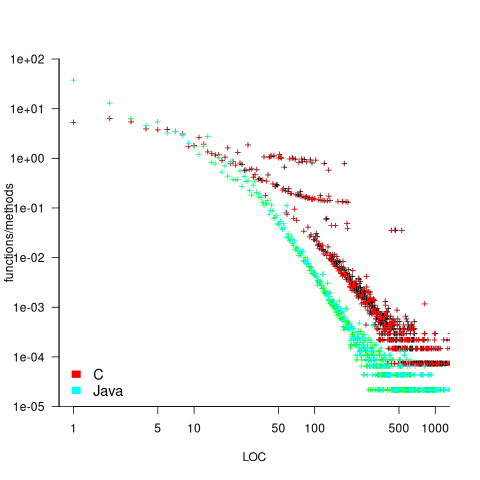
The large number of 1-line Java methods is assumed to be due to the widespread use of getters/setters. For the most common function/method sizes (i.e. 1 to 10 lines), have C and Java very different distributions, but follow a very similar power law for more than around 50 lines. Will LLM generate code contain this C/Java size difference, or will it have a completely different distribution (coding agents do seem to generate more code)?
Pre-object-oriented algorithmic languages can be classified into two families, those influenced by Fortran and those influenced by C.
In Fortran arrays are 1-based, while in C they are 0-based. The base-value for arrays is common knowledge, which LLMs handle. The more obscure differences, which rarely occur in source, are more likely to be overlooked.
Fortran and C have differences in operator precedence. The significant difference is the relative precedence of the unary not operator, and the binary equality/relational operators. The expression: ! x == y is equivalent to .not. (x == y) in Fortran, and equivalent to: (!x) == y in C. When asked to convert a C function containing the unbracketed form of the expression to Fortran, both Grok 4.6 and ChatGPT 5.5 note the different operator precedence and insert the appropriate parenthesis.
Both C and Python are popular languages with huge quantities of source publicly available. The token sequence: x < y == y, is parsed as: (x < y) == y in C, but in Python it is parsed as: (x < y) and (y == y). Both Grok and ChatGPT note the different operator precedence and insert the appropriate parenthesis.
There are a variety of differences between C and C++. However, source containing occurrences of all but two of them will produce a compile time error.
The following difference is known in compiler writer circles, and both Grok and ChatGPT note the different possible behaviors:
template_name < a , b > - 5 // equivalent to (template_name < a , b >) - 5) non_template_name < a , b > - 5 // equivalent to (non_template_name < a) , (b > - 5) |
The C/C++ difference that is much more likely to be encountered is the expression sizeof('a'), where C promotes the character 'a' to an int (which commonly has size 4; on DSP processors char often occupies the same number of bits as an int, giving both of them a size of 1), while C++ 'a' has type char (which is defined to have size 1).
There are sometimes behavior differences, for the same source, between versions of the same language specification. For instance, the following somewhat obscure difference between the C90, C99, and C11 language standards:
#include <stdio.h> #define M(U) sizeof(U"s"[0]) int main(void) { switch(M("")*2 //**/ 2 ) { case 1: printf("C90\n"); break; case 2: printf("C99\n"); break; case 8: printf("C11\n"); break; } } |
When asked what this program outputs, ChatGPT only considers C11, and 'corrects' itself after I pointed out the C90 lexical behavior. Grok only considers the latest standard, and when asked about producing other outputs, runs gcc with various -std options to find the other cases.
Both LLMs used (Grok 4.6 and ChatGPT 5.5) handled all the language differences I tried. Will cheaper to use coding agents, using LLMs containing an order of magnitude fewer parameters, be as effective at handling obscure differences? We will have to wait and see.
Source line length before coding agents
Will coding agent generated source code contain the same consistent patterns of behaviors that appear in human written source?
A brief analysis would suggest that the answer is: Yes. LLM training data is human written code, and coding agents are generating code to implement the functionality that developers would have otherwise implemented themselves.
Some coding patterns are driven by historical accidents, or at least appear to be. A line of code has to be visible on the display seen by the person writing it. Consequently, a line of source containing more characters that can be displayed on a line are likely to be rare. The plot below shows the number of C/C++ source lines containing a given number of characters in early 2000 (red) and 2026 (green), and the number of lines containing a given number of tokens in 2000 (blue), lines are fitted exponentials, and vertical grey lines at 80 and 120 characters (common default value used for tab characters; code+data):
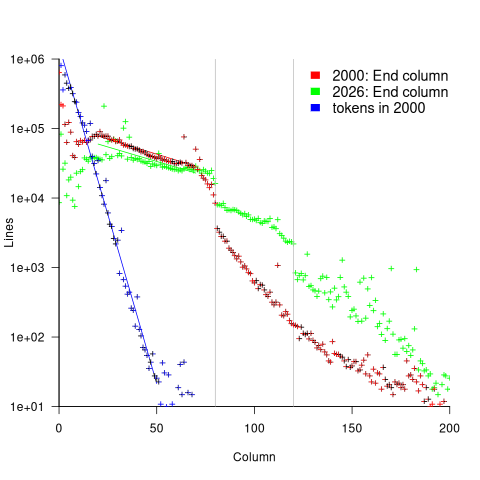
The dramatic drop in the number of lines of a given length, just below 80 characters, is consistent with the majority of character-based displays having lines containing 80 characters (the same as punched cards). A revolution in display technology happened between 2000 and 2026, namely CRTs were replaced by LCDs, significantly increasing possible display width. The decline in number of lines containing a given number of characters has decreased since 2000. In 2026, the 80 character line length break-point is less dramatic than in 2000, and the decline a lot less steep. Also, there appears to be a new break-point emerging at 120 characters; perhaps without LLMs the 80 character break-point would have gradually disappeared. While bit-mapped displays don’t have lines, existing practices live on and evolve.
The number of lines containing a given number of tokens, for the early 2000 measurements, decreases exponentially, with  . Whitespace indentation adds characters, not tokens.
Most long lines are caused by indentation of the source code, e.g., indenting the body of an if-statement. Indentation is used to reduce the developer effort needed to understand statement clustering and sequencing.
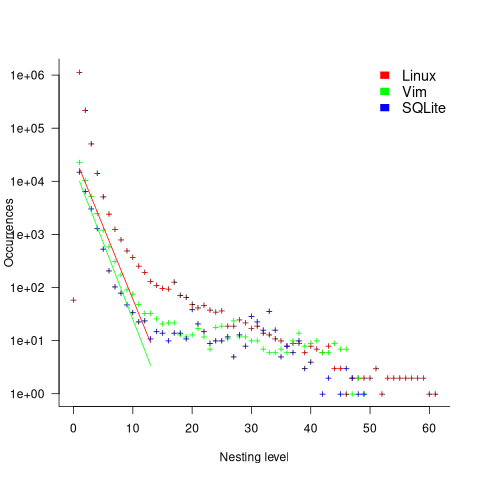
The plot below shows the number of if-statements occurring at a given nesting level, along with regression fits, of the form  , to the 2026 Vim and SQLite data; the Linux data was better fitted by a power law (code+data):
Some of the reasons developers write deeply nested code include: the nested code accesses local variables that would be a hassle to pass as function arguments, creating a function would interrupt their train of thought.
Deep nesting is often cited as bad practice, along with the usual unsubstantiated claims about it being error-prone, or hard to understand, or whatever.
Coding agents indent code because the training data contains indented code, and because the generated source is likely to be looked at and modified by developers. Attention based LLMs include information on the position of the token on a line, so given the contents of the training data, coding agents are unlikely to generate lines containing more than 80 characters.
If a time is reached when most developers don’t look at agent created code (few look at the assembly code generated by compilers), its visual layout becomes irrelevant. There are cost savings to be made by not indenting or limiting nesting depth. Indentation increases coding agent costs by consuming more tokens. Creating a new function consumes more tokens that simply generating a deeper nesting level.
If a developer wants to see indented source, they can always use a pretty printer.
A coding agent can be told not to indent, but given their training data do they indent internally and then remove it, i.e., an increase in token usage? This is another question to the growing list of Mechanistic interpretability problems.
Project implementation time savings using coding agents
To what extent do the significant savings made from using coding agents reduce the total cost of creating a software system?
The SEA Data Warehouse dataset contains detailed records of time spent in various phases of safety critical projects. Just what is needed to estimate an answer to this question, at least for safety critical software.
The development of typical commercial software differs from safety critical software in the amount of effort that goes into requirements, design, documentation, and testing. While the safety critical people claim that it’s all about the processes they follow, there is no evidence to show that any process is better than another. What matters is that the process ensures that the requirements, design, documentation, and testing are good enough for the intended use of the software.
When producing code is cheap, teams looking to be paid to create software systems are going to have to add value by delivering the kind of reliability and all encompassing application support that safety critical software is intended to provide.
The plot below shows, for the 289 projects that spent more than 2-days Code phase, the fraction of time spent in the most common project phases, ordered by fraction spent in Code phase (code+data):
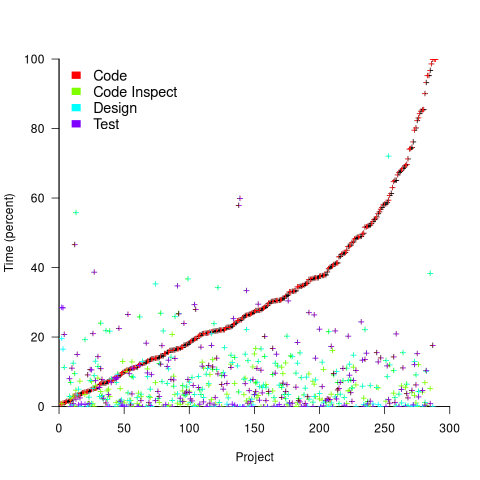
The average percentage of project time spent in the Code phase was 32% (does not include time spent in the Code review phase).
If we assume that coding agents reduce the time spent on coding by, say, 90%, and on all testing activities by, say, 50%, how much would total project time be reduced? The plot below shows, for the 289 projects, original project time (red) and estimated LLM project time (blue/green; code+data):
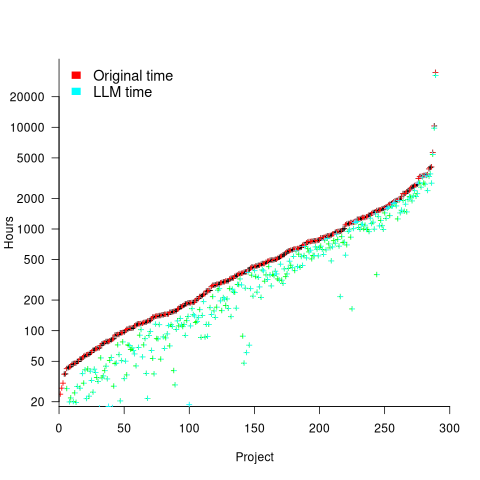
The general pattern visible is that as the number of project hours increases, the relative LLM saving shrinks. Around 10+ projects show substantial savings.
It’s possible that use of coding agents will increase the amount of time developers spend in the Code review phase (after any LLMs savings made in this phase). The 50% savings across all testing activities is very simplistic, and we will have to wait a few years for things to settle down and data to become available.
Around 10-15% of time is spent in Design, Design review, Design Inspection phases. Will LLMs save a significant amount of time for these phases, or should people continue to be hands-on for this work?
Experienced developers are well aware that coding agents have not removed the need for software developers. This post provided some data+analysis showing that developers are still needed, although the number of the people having this job title will decrease. Perhaps the software developer job title will not exist in 10-years, and this kind of work will be commonly known by another name.
Software effort estimation in 2026
It’s 2.5 years since my 2024 post summarizing what I knew about software effort estimation. For ongoing projects the role of estimation is as a planning tool, breaking down a large chunk of work into what are estimated to be small, well-defined, chunks. With two-thirds of estimates being within a factor of four (over or under) of the actuals, accuracy was not a primary goal.
The impact of coding agents capable of implementing these small tasks for peanuts is on developer staffing, not on the need for planning and breaking down work into connected small chunks.
Coding agents follow the specification they are given. Large, complicated programs will have large complicated specifications, which are likely to require a lot of human effort to create. For instance, the specification for the recent LLM generated C compiler
How long will it take to create a specification and how many iterations will be needed to create a good enough program? Estimation has not gone away, it has just moved upstream of the implementation. While specifications have existed millennia longer than software development, we are at the start of learning to use them to direct coding agents (the term vibe coding was created in February 2025). While logs of developer coding agent sessions are starting to be collected, it will take some years for patterns of practice to stabilize.
The process followed to estimate Function Points appears to be ideally placed to be extended to cover specification creation for coding agents.
Peanuts in bulk can be expensive. The novelty of much lower costs, when using coding agents, will soon wear off. Agent costs will become the new normal, which means there will be pressure to reduce them, and management will want estimates because the requirement to fill in boxes has not gone away.
Is agent token consumption purely a driven by the LLM(s) used and the selected configuration values? A recent study investigated the impact of the wording of the specification on the tokens spent by a selection of agents. The results showed that a specification containing bare user stories increased token spending by 30%. We will have to wait to find out whether the implications of this result (i.e., investing in more detailed user stories reduces token spending) replicates.
It would be very useful to have an estimate of likely token usage for a given specification, before any code is generated, or perhaps a real-time cost estimate during generation. One study found that current frontier models failed to accurately predict their own token usage (correlation of 0.39), humans predictions were equally poor.
Many projects don’t have a separate line item for testing costs, which often get bundled with implementation costs (the SEA Data Warehouse dataset separates out design/implementation/testing effort). Large projects may have people who work on integration and/or release testing.
When coding agents are used, testing is clearly a distinct piece of work separate from implementation. How effective is the specification used to generate the code at generating good enough tests? Current research is an extension of existing testing practices, rather than anything coding agent specific. A lot of existing research has focused on unit testing, and of course models have been fine-tuned for unit testing.
Implementation cost reductions have brought N-version programming into the realm of consideration for some projects.
Will the way developers work change to be like tradesmen who are hired to install a new fitted kitchen or bathroom? With developers installing new application functionality specified by the client. Perhaps some will be more like builders hired to make structural changes to a house, while others will do small jobs, like plumbers, electricians and carpet fitters.
As always, some researchers fail to move on when the world changes and continue to publish papers that use LLMs to estimate human task implementation time.
Number of projects worked on concurrently
Developers working for companies whose business is project based are often involved with multiple projects at the same time. If one project is held up, they have other projects to work on (reducing days when there is no project for them to book their time to).
How many software projects might a developer be working on at any time, and how is their time distributed across projects?
I was hoping that the SEA Data Warehouse dataset would provide some answers. However, while it contains detailed task data on 1,211 software projects, many of the people involved on these projects also worked on projects that are not included in the dataset (or they only worked a few hours a day, or the data is not as complete as claimed).
The 2,271 distinct people in the dataset worked on a total of 210,088 person days, working an average of 190 minutes (3.2 hours) per day. The plot below shows the number of minutes worked on each of the 210,088 person days, in sorted order (code+data):

A 7.5-hour work day contains 450 minutes; what were they doing during the other 260 minutes each day? If people were not working on one of the projects in the dataset, they were presumably working on project(s) that are not in the dataset.
Within the available data, how many projects were individuals working on during various time intervals? The plot below shows the percentage of time intervals (there are more days in the year than weeks, and more weeks than months, and to make the plot easier to interpret the counts for each time interval has been normalised) where a given number of projects were worked on by an individual during a particular time interval, for day/week/month intervals, with fitted exponential models (exponents are: -2.8, -2.2, and -1.6, respectively; code+data):
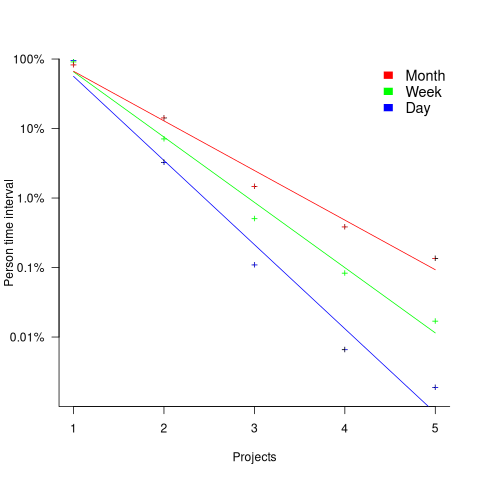
For the 1-project case, the percentage values are higher for days than weeks, and higher for weeks than months. However, the approximate nature of the fitted regression lines happens to have this the order reversed.
The plotted values are a lower bound for the number of projects an individual worked on within any of the time intervals. The average number of minutes worked per day implies that most people are working on at least two projects every day.
End-user Pentium and SIMM prices in the 1990s
People buy a computer today because they have a problem that needs to be solved today, or in the near future. If today’s computer is good enough to solve today’s problem, then any expectation of the next generation being substantially faster is irrelevant.
If a cpu manufacturer (e.g., Intel) knows that the next generation, available in less than 18 months, is going to be substantially faster, how do they price the existing products over the months before and after the next generation is launched? Similarly, for memory chip manufacturing businesses (there used to be many) knowing that the next generation, in less than 18 months, is going to have twice the storage capacity, how the existing products be priced over the months before and after the next generation is launched?
During the 1990s desktop computers regularly became noticeably faster. Computers also regularly became faster in earlier decades, but early manufacturers built their own cpus, rather than selling them to others to integrate into a finished product. Yes, there were manufacturers selling cpus in the 1980s, but the market was fragmented, and any trends that might be present are obscured by market turbulence.
At the start of the 1990s, compiler messages appeared slowly enough that they could be read as they scrolled up the screen, but within a few years it was hard work spotting just a few words before the lines disappeared at the top of the screen. When working on a new machine for the first time, developers would be amazed at the rate compiler messages scrolled up the screen, but this rate quickly became the new normal.
During the 1990s, the performance of Intel’s x86 cpu family increased exponentially, and memory device capacity grew exponentially.
Manufacturer pricing data for cpu/memory chips in the 1990s is somewhat sporadic. However, end-user prices are listed in computer magazine adverts. The paper The economics of PC remanufacturing by G. Ferrer lists monthly end-user prices between August 1995 and January 1997, extracted from adverts in the British magazine Personal Computer World. I extracted prices for the same cpus/memories from the earlier/later editions available online. All monthly prices are averaged over all advertised prices found in each month’s edition.
The plot below shows monthly prices for Intel’s 80486DX2 and Pentium processors running at various clock rates; the extended straight lines are fitted exponential models (code+data):

When first released, higher performing cpus were sold at a premium price, which decreased (exponentially) at around 30% per year. Staying on the leading edge of computer performance required regularly paying premium prices to buy a new computer containing the latest cpu.
In the 1990s memory chips were packaged in SIMMs, of various form factors, which were superseded in the late 1990s by DIMMs, and then the DDR SDRAM we use today. The plot below shows the price of non-parity 72-pin SIMMs chips having a given capacity (code+data):
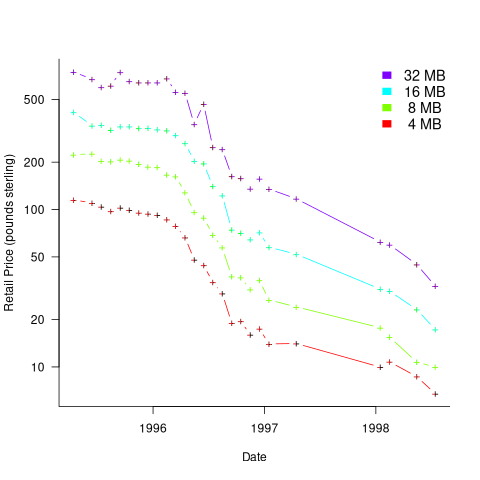
The decreases extend over a longer period than the cpu prices (presumably because people are adding more memory to older computers that are not being replaced).
The price changes could just as well have been plotted using a linear scale, as the exponential one used. In both cases there are distinct periods where the prices form a roughly decreasing line.
Why are manufacturers able to make such large reductions in the prices of the devices they sell?
Many semiconductor devices are fabricated on a large wafer. When the fabrication process for a particular device is new the yield may low, i.e., only a small percentage (perhaps 10%) of devices are functional. As production experience is gained the device yield increases and the production process is speeded up, i.e., more functional devices are produced for not much more cost.
There are two supplies for Pentiums, Intel and AMD, with Intel dominating, and having a large profit margin. There are many manufacturers of memory devices, it is a commodity market with slim profit margins.
An analysis of the extent to which profit margins and market structure influence pricing is outside my domain expertise.
Computers installed in the UK during the 1960s
The first commercially produced digital computer, the UNIVAC I, became available in 1951, and by 1961 the exponential annual growth in the number of computers installed was well underway (it may have been earlier, but earlier data is sparse).
For the UK, detailed annual installation data is listed in the paper: The Spread of Computer Usage in the UK, 1954-1970 by P. Stoneman (his PhD thesis: “Technological Diffusion and the Computer Revolution: The UK experience” is not available online {I have the book of the thesis}; perhaps someone from Cambridge could scan a copy of the thesis). The data comes from the trade periodical “Computer Survey”, and Stoneman extrapolated back from when it started in 1961. The plot below shows the number of computers installed in the UK in a given year, and the number still installed in subsequent years (colored line for each year), along with two fitted regression lines (both exponential; code+data):

Between 1958 and 1970 (end of the data) the annual growth rate of new computers was 34%. After the first year, installations decline at a rate of around 16% per year (presumably replaced by a more powerful system).
Which industries installed these computers? The plot below shows the annual spend (adjusted for inflation til 2026) on new computer systems by 26 UK industry classifications, the grey line is an exponential fit to the total, showing a 53% annual growth rate (code+data):
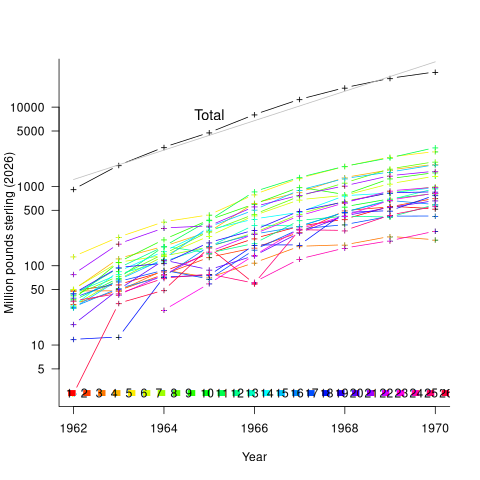
The mapping from colored line to industry is via the numbers/colors in the legend at the bottom of the plot, and the table below:
 Number           Industry description
    1      Aircraft Manufacturers and Guided Weapons
    2      Armed Services
    3      Atomic Energy
    4      Chemicals, Rubber, Glass, Plastics, Paints, Cosmetics
    5      Computer Manufacturers and Service Bureaux
    6      Electrical Engineering
    7      Ferrous and Non-Ferrous Metals, Mining and Quarrying
    8      Financial: Banks, Building Societies etc.
    9      Food, Drink and Tobacco Manufacturers
   10      Retail, Wholesale, Mail Order, Merchants
   11      General and Constructional Engineering
   12      Government Departments
   13      Government and Other Research Establishments
   14      Insurance and Assurance
   15      Local Government
   16      Motor
   17      Oil
   18      Public Bodies (mainly Post Office)
   19      Public Utilities (Coal, Electricity, Gas, Water)
   20      Transport
   21      Universities and Other Educational Establishments
   22      Textiles, Clothing, Furniture and Toys
   23      Publishing, Printing, Paper, Book clubs
   24      Sports, Leisure, TV, Films, Hotels
   25      Miscellaneous
26 Unknown |
The higher spending industries tended to be those with lower Numbers, while the lower spending industries are at the higher Numbers. The total spend on new computers grew at 53% per year.
How much computer power did the £27.8 billion (in 2026 money) spent in 1970 buy?
In the 1960s most computers were used by businesses for regularly (i.e., weekly, monthly, quarterly) performing simple calculations on large quantities of information, and then printing the results. The printed outputs were items such as employee payslips, gas/electric/water bills, and invoices between companies.
The scientific/engineering uses of computers attracted most of the coverage in the popular press (after a few iterations, weekly/monthly payroll becomes deadly dull), and bought the larger machines, but businesses had a lot more money and an immediate need.
The British Commercial Computer Digest (published annually between 1959 and 1970, and also based on “Computer Survey” magazine data) lists computer installations by purchaser and computer installed, along with tables of computer performance, monthly lease prices and selling prices. The following data was obtained from the 10th edition, published in 1969.
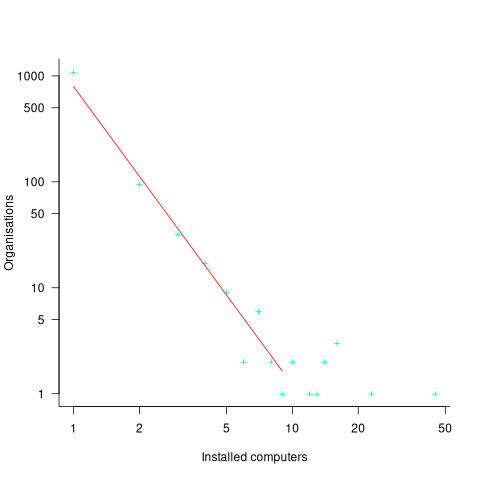
The plot below shows the number of organizations having a given number of computers installed, along with a fitted power law whose exponent is -2.8 (code+data):
The table below shows the six computer models, out of 48, that represented 60% of all computers installed. The monthly rentals are an estimated average, and inflation adjusted 2026 pounds sterling. Possible memory capacities varied between 4k to 64k (yes, thousands of bytes). Readers will be familiar with the IBM 360, the ICL 1900 series was the UK’s home-grown response (via Canada):
        Computer    Installed    Percent   Monthly rental
       IBM 360/30     305          17          £42k
       ICL 1901       253          14          £21k
       IBM 360/20     147           8          £17k
       ICL 1902       138           8          £37k
       IBM 360/40     127           7          £84k
ICL 1903 101 6 £45k |
The compute capacity of UK computers installed in 1969 might be less than one 2026 smartphone. However, the computer printer capacity (in bills/payroll slips/invoices/etc) might be about the same as it is today, down from a peak in the late 1990s, when the major push to electronic billing started.
Recent Comments